💻 命令行:和电脑“说话”💻 Command Line: Talk to Your Computer
上一片里,💻小电脑按响系统调用的铃,请内核代办杂事。可鼠标点一下只办一件事:能不能直接和电脑“说话”,一句话办完?能——打开终端,打字下命令。Last leaf, 💻 Little Computer rang the system-call bell and asked the kernel to help out. But one mouse click does just one thing. Can we simply talk to the computer and finish the job in one line? Yes — open the terminal and type a command.
第 1 步:终端长什么样Step 1: What a terminal looks like
你平时点图标,电脑背后发生了什么?When you tap icons all day, what is the computer doing behind them?
左边是图形界面:用鼠标点着选晚餐。右边是命令行:打字下命令。$ mkdir photos 就是告诉小电脑,新建一个叫 photos 的文件夹。一句话,办一件事。Left: the graphical interface — tap and click to order dinner. Right: the command line — type to give orders. `$ mkdir photos` tells Little Computer to make a folder called photos. One line, one job done.
一行命令里,哪个词是“做什么”,哪个是“对谁做”?In one command line, which word says “do what”, and which says “to what”?
第 2 步:常用命令:看、走、问路Step 2: Everyday commands: look, walk, ask the way
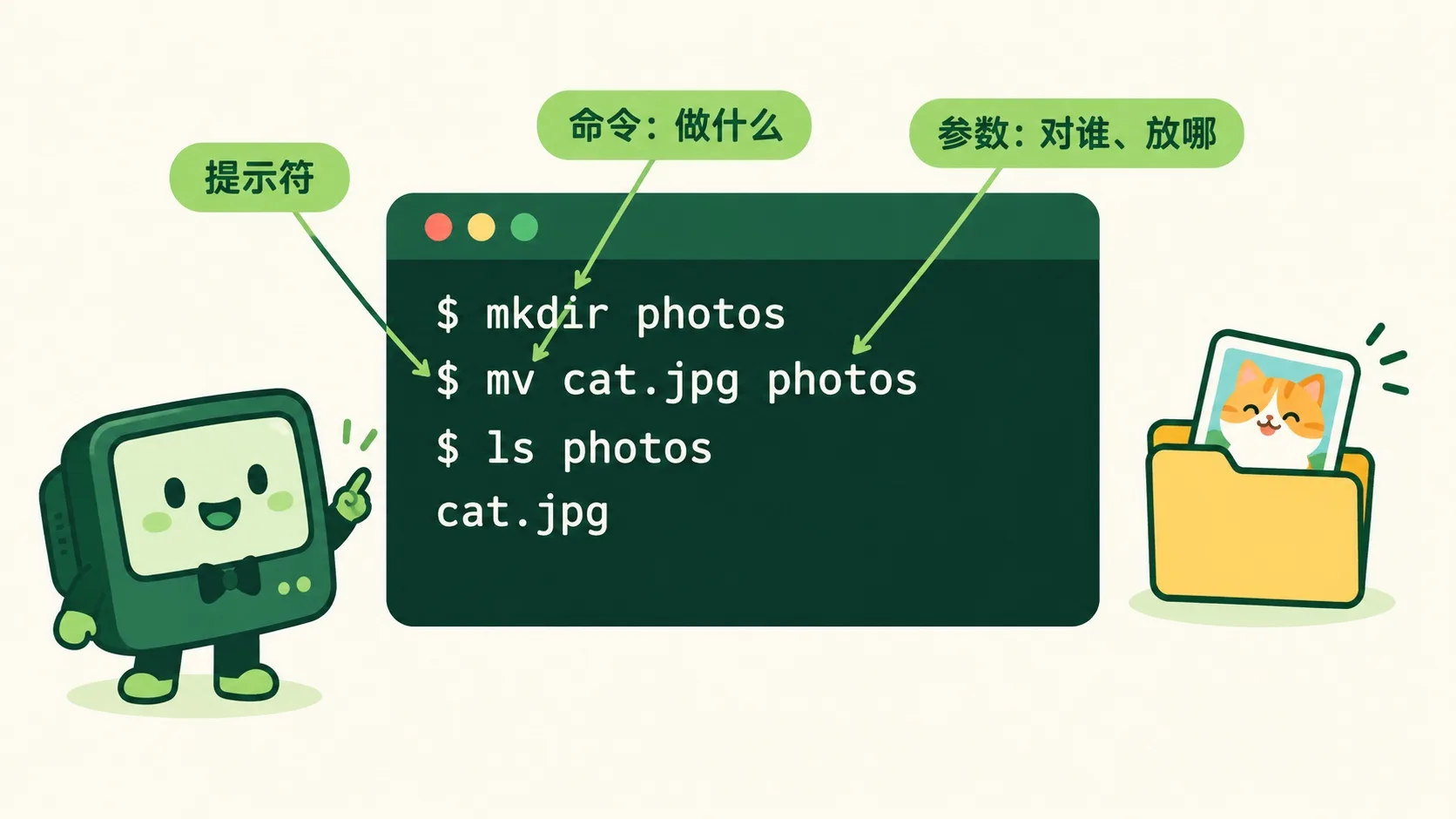
一行命令有三块:提示符 $、命令(做什么)、参数(对谁、放哪)。ls 看看有什么,cd 走进文件夹,pwd 问“我在哪”。mv cat.jpg photos,就把小猫照片挪进了 photos。One command has three parts: the `$` prompt, the command (do what), the arguments (to what, where). `ls` looks around, `cd` walks into a folder, `pwd` asks “where am I”. `mv cat.jpg photos` moves the cat photo into photos.
一次只敲一行,能省下多少重复劳动?Typing just one line at a time — how much repeated work can it save?
第 3 步:连起来用:管道与脚本Step 3: Chain them up: pipes and scripts
命令能用竖线连成管道,前一个的输出变成后一个的输入。1000 张照片要改名:鼠标要点 1000 次,一行命令一次搞定。多行存成脚本,一键重来。服务器没有屏幕,全靠打字。Commands join with a pipe `|`: one's output becomes the next one's input. Renaming 1000 photos takes 1000 clicks, but one line does it at once. Save lines as a script and replay them in one click. Servers have no screen — typing is the only way in.
🎮 迷你终端:收好两张照片(30 秒)🎮 Mini terminal: tidy up two photos (30 seconds)
在终端里打字、按回车,完成 4 个任务:看看、建文件夹、挪照片、走进去确认。Type in the terminal and press Enter. Finish 4 tasks: look around, make a folder, move the photos, walk in and check.
一句话记住它:命令行 = 和电脑说话的打字窗口,一句话顶一万次点击。Remember it in one line: the command line is a typing window for talking to your computer — one line beats ten thousand clicks.
提示符后面打字:命令说“做什么”,参数说“对谁”Type after the prompt: the command says “do what”, arguments say “to what”ls 看、cd 走、pwd 问路,mkdir 建、mv 搬`ls` looks, `cd` walks, `pwd` asks the way; `mkdir` makes, `mv` moves管道连起命令,脚本存起命令,服务器全靠它Pipes chain commands, scripts save commands — servers live on them
内容参考 OpenStax 等公开教材,多来源核对 · AI 生成、人工审核 · 发现错误欢迎指正,帮这片叶子长得更好。Based on OpenStax and other open textbooks, cross-checked across sources · AI-generated, human-reviewed · Spotted a mistake? Tell us — help this leaf grow.
 Back to tree